
Save it. Share it. Git for Sarah.
A quick guide to saving your project and sending it to Chris — the exact steps, nothing extra.
Why this exists: Chris wants to see your project and work on it together. Git is the tool that lets you save your progress (like checkpoints) and hand a copy to him without emailing zip files back and forth. Once your project is on GitHub, he can open it, and any updates you push later show up for him automatically.
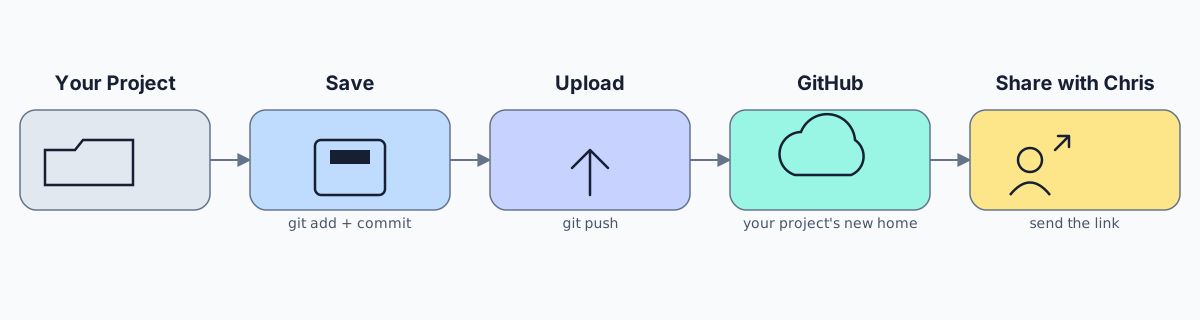
1 What's actually happening
No commands to memorize — just the idea, so it's not a black box:
Your Project — the folder on your computer, exactly as it is now.
Save — git takes a snapshot of everything, like a checkpoint you can always rewind to.
Upload — that snapshot gets sent up to the internet.
GitHub — a free website that stores your project and gives it a page + a link.
Share with Chris — you send him that link, he opens it, done.
2 Paste this into Claude
This does the whole thing for you — Claude reads it, explains anything you're unsure of, and saves + uploads your project. Open Claude in the folder with your project (or tell it where the folder is), then copy the box below and paste it in as your message.
Copy this prompt
One paste. Claude handles the rest.
I want to save my project using git and put it on GitHub so I can share it with my friend Chris. I've never used git before, so as you go, briefly explain in plain English what each step is doing — no jargon.

Please:
1. Check if this folder is already a git repository. If not, set one up.
2. Save (stage + commit) all my current files with a clear, short commit message.
3. If I don't already have a GitHub repository for this project, tell me exactly how to create one at github.com/new (I should NOT add a README, since my files already exist) — then wait for me to give you the repository URL.
4. Connect this project to that GitHub repository and upload (push) my code.
5. Confirm it worked, and give me the exact link to send Chris.

If you don't have the ability to run terminal commands yourself, give me the exact commands to copy and run one at a time, explaining each one briefly before I run it.

Also tell me, in one or two lines, what to say to you next time I make changes and want to save + share an update.3 Share it with Chris
Claude will hand you a link that looks like https://github.com/yourname/project. Send that straight to Chris — that's it.